Territories Parameters of Territory |

|

|

|

|

|
||
|
Territories Parameters of Territory |
|
|
|

|

|

|
Territories
Parameters of Territory
|
Territories Parameters of Territory |
|
|
|
|
|
||
|
Territories Parameters of Territory |
|
|
|
|
|
|
|
|
||
Only the Editable Parameters on the left side of the table can be edited. The remaining Territory parameters are calculation results.
Editable Parameters
View on Layout
Territory Area
|
Calculation for Pixel density pattern Criterion
Values in Territory Min.
Monitored area by Regions 1..10 |
Cameras Inside
Monitoring
Area, monitored by several cameras
Devices inside |
The Label field allows you to mark rows with custom labels. You can then filter, sort and group rows by labels, as well as by any other table fields and their combinations.
|
Arbitrary name of the territory.
|
Arbitrary description of the territory.
|
Each territory is assigned a Pixel Density pattern from those available in the Pixel density window (e.g. Home Office Scientific Development Branch, P 78.36.008-99, European Standard EN 50132-7, Johnson Criteria, etc.), regardless of the Pixel density patterns assigned to individual cameras.
Each Pixel Density pattern has a Calculation Criterion set from the list:
|
PTZ cameras cannot continuously monitor their control areas. Therefore, the PTZ Territories parameter can be used to exclude PTZ cameras from the calculation. To exclude PTZ cameras from the Territory calculation, uncheck the checkbox.
|
View on Layout
The color that will be used to draw polygons included in this Territory. If white is selected, the polygons will be drawn using the colors specified in the Line Type and in the Current Construction Parameters Panel.
|
The hatching type for polygons included in this Territory. Here you can also choose a solid fill or no hatching.
|
The layout on which the Territory's polygons are located.
Filled automatically after including the first polygon. Subsequent polygons of the territory must be located on the same layout.
|
Number of polygons included in the Territory.
Polygons must be on the same layout and closed. Polygons may or may not intersect.
See also: +Add
|
Territory Area
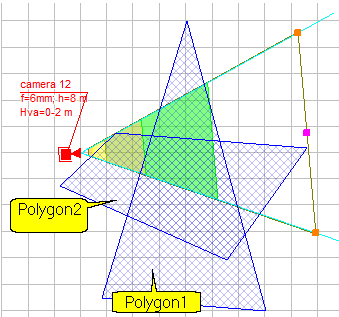
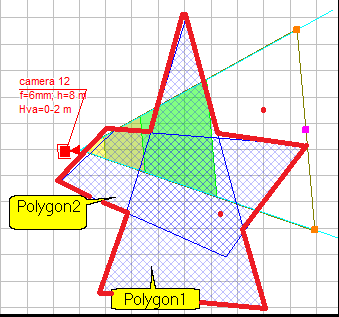
The total area of the territory is equal to the area of the figure obtained by combining all polygons included in the territory.
The area is equal to the sum of the areas of the polygons only if the polygons do not intersect, otherwise the total area of the territory is less than the sum of the areas of the individual polygons.
|
The area of the territory monitored by cameras.
If the Result in % checkbox is checked, the Monitored Area is given as a % of the Whole area of the Territory.
When calculating Territories, only the portions of camera control area projections that fall within the regions of the assigned Pixel Density Pattern are considered. Control areas outside these regions are considered insufficiently detailed and are not considered.
When calculating Territories, hidden cameras and hidden camera positions, cameras and camera positions located on invisible layers or in invisible groups, and hidden parent cameras of multi-sensor cameras are not considered. This allows you to exclude specific cameras from territory calculations.
PTZ cameras cannot continuously monitor their control zones. Therefore, the PTZ Territories parameter can be used to exclude PTZ cameras from the calculation.
|
Calculation for Pixel density pattern
Criterion
The name of the working Criterion in the Pixel Density pattern assigned to the Territory.
The Criterion is configured in the Pixel Density window.
|
Values in Territory
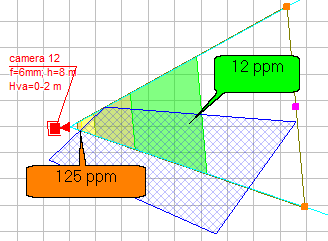
The minimum Criterion value within the Territory, excluding the zero value.
For example, the minimum pixel density within the territory is 12 pixels/meter.
|
The maximum Criterion value within the Territory.
For example, the maximum pixel density within the territory is 125 pixels/meter. This pixel density is achieved over a very small portion of the territory.
|
The average Criterion value within the Territory, including the non-viewable portion. Therefore, the average Criterion value may be lower than the minimum.
For example, the average pixel density within the Territory is 4.6 pixels/meter.
The average pixel density is not the average of the minimum and maximum pixel densities. The average pixel density is calculated taking into account the intersection area of each region of the Pixel Density pattern with the territory, the unviewable area, and the whole area of the territory.
|
Monitored area by Regions
1..10
Region name in the Pixel Density pattern.
For example: Detection, Recognition, Identification.
|
The Criterion value in the region.
For example: for the Detection region, the criterion value is 25 pixels/meter; for the Recognition region, the criterion value is 125 pixels/meter; for the Identification region, the criterion value is 250 pixels/meter.
|
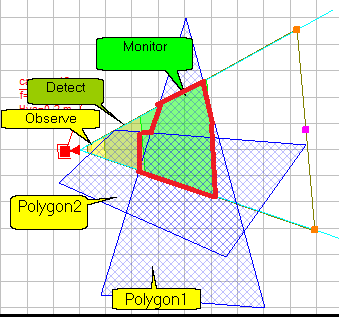
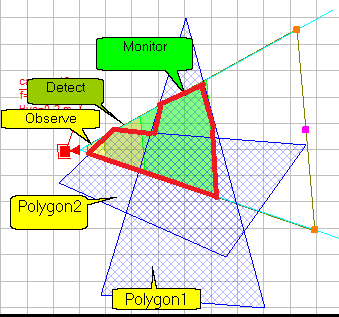
If the Intersections only checkbox is checked, the field shows the area of intersection of the territory with the corresponding pixel density region.
For example for Monitoring region
If the Intersections only checkbox is not checked, the field shows the area of the territory that satisfies the boundary value of the Criterion (“not worse than..”).
For example, area of a territory that satisfies the most stringent value of the "Identification" criterion satisfies all less stringent values of the criterion. Therefore, the area of the territory that satisfies the "Identification" value is calculated as the union of the "Identification" and "Recognition" regions. The area of the territory that satisfies the least stringent value of the "Observation" criterion is calculated as the union of all regions of the Pixel Density pattern.
The area can be displayed in square meters (feet) or as a percentage of the whole area of the territory, depending on the checkbox Result in %
When calculating Territories, only the portions of camera control area projections that fall within the regions of the assigned Pixel Density Pattern are considered. Control areas outside these regions are considered insufficiently detailed and are not considered.
When calculating Territories, hidden cameras and hidden camera positions, cameras and camera positions located on invisible layers or in invisible groups, and hidden parent cameras of multi-sensor cameras are not considered. This allows you to exclude specific cameras from territory calculations.
PTZ cameras cannot continuously monitor their control zones. Therefore, the PTZ Territories parameter can be used to exclude PTZ cameras from the calculation.
|
Cameras
Inside
The number of cameras installed within the boundaries of the Territory.
|
List of cameras installed within the boundaries of the Territory.
|
Monitoring
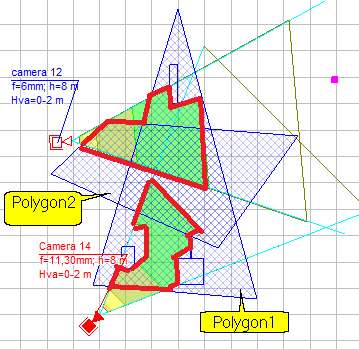
The number of cameras whose view area projections intersect with the Territory.
When calculating Territories, only the portions of camera control area projections that fall within the regions of the assigned Pixel Density Pattern are considered. Control areas outside these regions are considered insufficiently detailed and are not considered.
When calculating Territories, hidden cameras and hidden camera positions, cameras and camera positions located on invisible layers or in invisible groups, and hidden parent cameras of multi-sensor cameras are not considered. This allows you to exclude specific cameras from territory calculations.
PTZ cameras cannot continuously monitor their control zones. Therefore, the PTZ Territories parameter can be used to exclude PTZ cameras from the calculation.
|
List of cameras whose view area projections intersect with the Territory.
When calculating Territories, only the portions of camera control area projections that fall within the regions of the assigned Pixel Density Pattern are considered. Control areas outside these regions are considered insufficiently detailed and are not considered.
When calculating Territories, hidden cameras and hidden camera positions, cameras and camera positions located on invisible layers or in invisible groups, and hidden parent cameras of multi-sensor cameras are not considered. This allows you to exclude specific cameras from territory calculations.
PTZ cameras cannot continuously monitor their control zones. Therefore, the PTZ Territories parameter can be used to exclude PTZ cameras from the calculation.
|
Area, monitored by several cameras
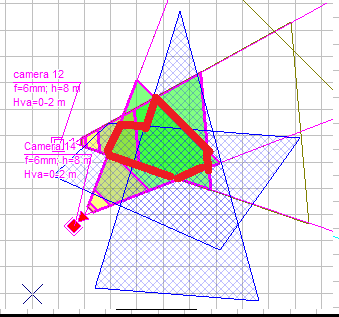
The area of the Territory observed by two, three and four cameras simultaneously.
The area can be displayed in square meters (feet) or as a percentage of the whole area of the territory, depending on the checkbox Result in %
When calculating Territories, only the portions of camera control area projections that fall within the regions of the assigned Pixel Density Pattern are considered. Control areas outside these regions are considered insufficiently detailed and are not considered.
When calculating Territories, hidden cameras and hidden camera positions, cameras and camera positions located on invisible layers or in invisible groups, and hidden parent cameras of multi-sensor cameras are not considered. This allows you to exclude specific cameras from territory calculations.
PTZ cameras cannot continuously monitor their control zones. Therefore, the PTZ Territories parameter can be used to exclude PTZ cameras from the calculation.
|
Devices inside
The number of devices installed within the boundaries of the Territory.
|
List of designations of devices installed within the boundaries of the Territory.
|
See also: Territories, Table Interface, Pop-up menu, Parameters of Territory. Project Analysis. Working with Territories. Polygons included in Territories, PDF report>Territories