Territories |

|

|

|

|

|
||
|
Territories |
|
|
|

|

|

|
Territories
|
Territories |
|
|
|
|
|
||
|
Territories |
|
|
|
|
|
|
|
|
||
Graphics window Tool bar Territories |
|
Territories is a project analysis tool.
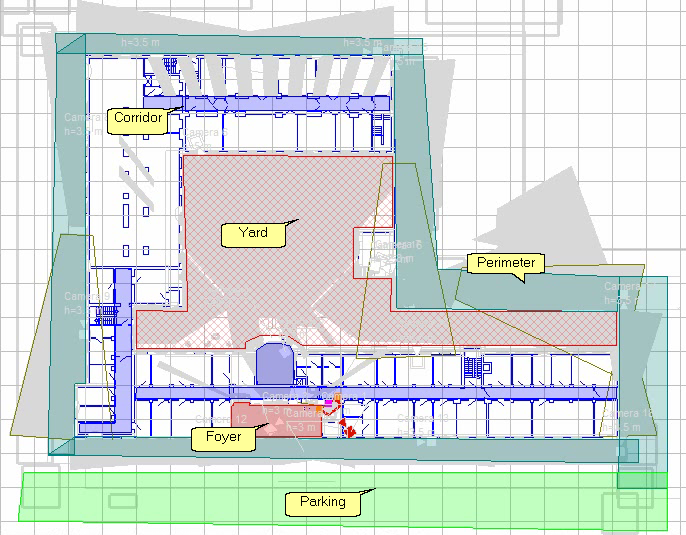
Territories are defined areas on the location layout that require video surveillance with specific parameters. VideoCAD calculates the video surveillance parameters the project provides within the territory boundaries and presents them as a table.
Using Territories allows you to:
| • | Formalize technical specifications and design results. A technical specification can be a simple list of areas marked on the layout with the required surveillance parameters. |
| • | Receive design results as numerical values convenient for analysis and further processing. |
| • | Efficiently handle projects with a large number of cameras, dense camera placement, and intersecting view area projections. |
| • | Using Territories is a step toward automating video surveillance design. |
Working with Territories is possible only in VideoCAD Professional
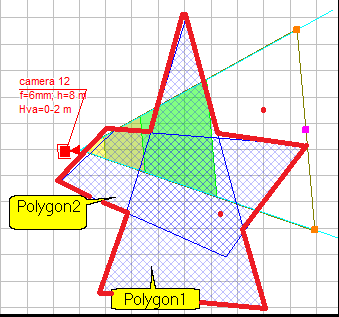
On the layout, each territory is bounded by one or more closed Polygons  of arbitrary shape.
Territory polygons in 2D can vary in color, shading type, or lack thereof, and can be hidden. In 3D, territory polygons can be bounded by vertical planes and vary in color or not displayed.
A project can have an unlimited number of territories. Territories can intersect and be nested within each other.
Each territory is assigned a Pixel Density pattern from those available in the Pixel density window (e.g. Home Office Scientific Development Branch, P 78.36.008-99, European Standard EN 50132-7, Johnson Criteria, etc.), regardless of the Pixel density patterns assigned to individual cameras.
Each Pixel Density pattern has a Calculation Criterion set from the list:
| • | vertical (horizontal) pixel density, |
| • | height (width) of the field of view, |
| • | number of vertical (horizontal) pixels per object of height (width), |
| • | portion of the height (width) of the field of view occupied by an object of height (width). |
According to the value of the Pixel Density pattern criterion, the parameters of each Territory are calculated:
| • | The minimum, maximum, and average values of the Criterion (e.g., pixel density) within the Territory; |
| • | The area of the territory observed in accordance with each region of the Pixel Density pattern (e.g., Identification, Recognition, Surveillance...). |
In addition, the parameters of each territory are calculated:
| • | Territory area, monitored by cameras; |
| • | Territory areas, monitored simultaneously by two, three, or four cameras. |
| • | Number and list of devices within the territory. |
Areas can be calculated as absolute values or as a percentage of the total area of the territory.
Area calculations are performed with the camera control zones limited by obstacles, taking into account shadowing.
When calculating Territories, only the portions of camera control area projections within the regions of the assigned Pixel Density pattern are considered. Control areas outside these regions are considered insufficiently detailed and are not considered.
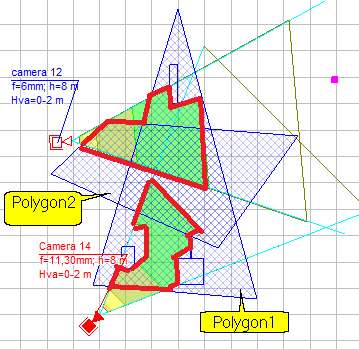
For each Criterion boundary value, the following can be calculated:
area of the territory satisfying the Criterion boundary value
or
area of the intersection of the territory with the corresponding pixel density region ( Intersections only )
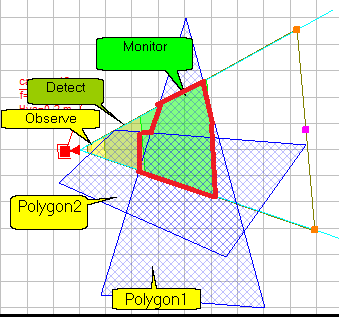
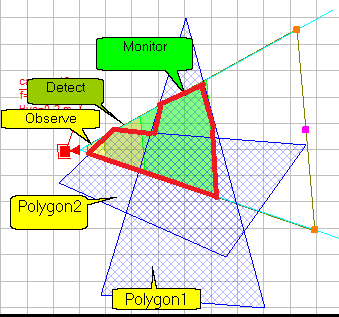
Example for the Monitor region:
Intersection of a territory of the two polygons with the Monitor region |
Part of the territory that satisfies the boundary value of the Monitor criterion |
|
|
For example, area of a territory that satisfies the most stringent value of the "Identification" criterion satisfies all less stringent values of the criterion. Therefore, the area of the territory that satisfies the "Identification" value is calculated as the union of the "Identification" and "Recognition" regions. The area of the territory that satisfies the least stringent value of the "Observation" criterion is calculated as the union of all regions of the Pixel Density pattern.
When calculating Territories, hidden cameras and camera positions, cameras and camera positions located on invisible layers or in invisible groups, and hidden parent cameras of multi-sensor cameras are not considered. This allows you to exclude specific cameras from territory calculations.
PTZ cameras cannot continuously monitor their control areas. Therefore, the PTZ Territories parameter can be used to exclude PTZ cameras from the calculation.
Territories with all parameters and calculation results are displayed in the Table of Territories.
 |
| Click to expand |
You can select only the parameters (columns) you want to display in the table, save table settings in Views, and quickly switch between Views.
The Table of Territories can be included in the PDF report.
See more: Table Interface, Tool bar, Pop-up menu, Parameters of Territory.
See also: Project analysis. Working with Territories. Polygons included in Territories, PDF report>Territories