|

|

|

|

|
|||
|
Equipment Tables Equipment parameters Parameters in Cable Log |
|
|
|

|

|

|
|
|
|
|
|
|
|||
|
Equipment Tables Equipment parameters Parameters in Cable Log |
|
|
|
|
|
|
|
|
||
Parameters highlighted in red are used when modeling equipment in VideoCAD; the remaining parameters exist only for comparison, creation of standard forms of cable log and reference purposes.
A unique row number in the table. When a row is added to the table, the number is generated automatically.
This is a service column; by default, this column is hidden.
|
The Label field allows you to mark equipment models with custom labels (e.g., OK, BAD, Order, Warehouse, Used, Obsolete, etc.). You can then filter, sort, group rows by labels, as well as by any other table fields and their combinations.
|
Alphanumeric designation of a cable section on the layout.
See also: Parameters in Equipment Database and Specification>Designation, Current Construction Parameters panel>Cables, Options box>Cameras and Devices>Symbols of Devices>Scalable, Options box>Fonts, Equipment numbering, Find on Layout
|
The color used to draw the wire.
For equipment, the Color can be set in the Specification. On the layout, the Color can be changed using the Current Construction Parameters Panel.
See also: Parameters of Equipment Database>Color
|
Route
The layout according to which the cable is laid.
|
The layer in which the cable is laid.
|
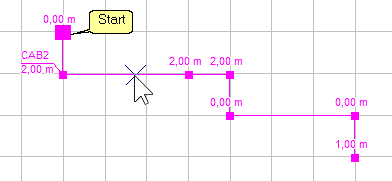
A device or camera to which the cable's start node is connected.
The beginning of cable in the editing state is marked with an enlarged grip.
You can swap the start and end of a cable in the Equipment Numbering window.
When calculating the Current in the Cable, the current consumption of a device connected to the start node of a cable is not taken into account, as the start point is typically connected to a power source, and if it's a consumer, its current does not flow through the cable.
The start point of a cable can be excluded by sequentially numbering devices (detectors) along the cable (alarm loop).
|
A device or camera to which the cable's end node is connected.
You can swap the start and end of a cable in the Equipment Numbering window.
|
Passage through
A list of device and camera designations to which intermediate cable nodes are connected. Ordered from the beginning to the end of the cable. After slash the distance along the cable from the beginning of the cable to each device is shown.
On the layout, cables are routed between placed devices and cameras. Multiple devices and cameras can be connected to a single cable, which is convenient for modeling alarm loops. A cable is considered connected to a device if its node is within the device's 3D box. A cable is considered connected to a camera if its node is no more than 2 cm from the camera lens, taking into account heights. Devices (detectors) or cameras connected to a cable can be numbered along the cable (alarm loop).
You can swap the start and end of a cable in the Equipment Numbering window.
|
Designation, diameter, and length of the draw-down pipe. Column according to Form 6 of the GOST 21.613 cable log. Not filled by the program; can be filled in manually.
|
Column according to Form 6 of the GOST 21.613 cable log. Not filled by the program; can be filled in manually
|
Column according to Form 7 of the GOST 21.613 cable log. Not filled by the program; can be filled in manually
|
Cable, wire
According to project
Copied from Specification, Name column.
|
Qty. number and cross-sections of conductors
Copied from Specification, Description column .
|
The cable length does not include reserves.
When automatically filling out the cable log, the sum of the lengths of all sections between cable nodes (taking into account the heights of the nodes) is entered into this field.
|
When automatically filling the cable log, this field records the total amount of cable reserve for connection to all devices and cameras connected to the cable.
The sum of the values in this field for each cable model is entered into the cable reserve for connection field for that cable model in the Specification.
|
Additional cable reserve as a percentage of the cable length. This is set manually and is included in the Length field calculation.
|
Cable section length, including all reserves.
When automatically filling the cable log, this field contains: the sum of the lengths of all sections between cable nodes (including node heights) +the sum of reserves for connection to all devices and cameras to which the cable is connected. +the cable reserve percentage set in the +-% field.
The sum of the values in this field for sections of each cable model is entered into the Qty field for that cable model in the Specification.
|
Laid
Model, Qty. number and cross-sections of conductors, Length, m
Column according to GOST 21.608 GOST 21.613 cable log. Not filled by the program; can be filled in manually.
|
Voltage drop on wire
If the checkbox is checked, the voltage drop calculation will be performed for this section of cable.
The calculation may not be performed or may not be performed completely if the required input parameters are missing: Length, m, Cross-section, mm2, Current in wire, A, Voltage at start, V
|
Input data
The cross-section value is copied from the Specification, field Cable cross-section, mm2.
In the case of the English units format, the cable core cross-section is displayed in AWG units.
|
Can be filled in manually.When automatically filling the cable log, the current is calculated by summing the values in field Current, A of all equipment connected to the cable, except for the device connected to the start node of the cable. The current consumed by a device connected to the start of the cable is not taken into account, as a power source is typically connected to the start, and if it is a consumer, its current does not flow through the cable. Only the current of consumers is summed; the current of power sources is not taken into account.
You can swap the start and end of a cable in the Equipment Numbering window.
|
Can be filled in manually.When automatically filling the cable log, This column contains the value of the Specification field Voltage, V of the first equipment connected to the cable from the first node.
You can swap the start and end of a cable in the Equipment Numbering window.
|
Calculation results
The diameter of a round core with a cross-section equal to the Cross-section, mm2
|
The resistance of a copper cable in both directions is equal to twice the resistance of the copper cable core with a cross-section of the core of Cross-section, mm2, and length of Length, m.
|
The voltage drop across a copper cable in both directions when current flows Current in wire, A, equal to twice the voltage drop across the core of a copper cable with a cross-section of the core of Cross-section, mm2, and length of Length, m.
|
The voltage at the end of a copper cable with a cross-section of conductor Cross-section, mm2, and length of Length, m, if the voltage at the start of the cable is Voltage at Start ,V, and current flows through the entire cable is Current in wire, A..
This is a simplified calculation of the voltage at the end of the cable that does not take into account the connection points to the cable and the current consumption of each consumer. The calculation result is accurate if all equipment is connected to the end of the cable; otherwise, the calculation result is underestimated. The full voltage calculation at each consumer is displayed in the Voltage along Cable, V field.
You can swap the start and end of a cable in the Equipment Numbering window.
The calculation may not be performed or may not be performed completely if the required input parameters are missing: Length, m, Cross-section, mm2, Current in wire, A, Voltage at start, V
|
A long string with voltages at each consumer when multiple consumers are connected to the cable at different distances from the source at the cable's start. The calculation takes into account the cable length from the beginning to the connection point and the current consumption of each consumer, as specified in the Specification, Current, A field.
The calculation may not be performed or may not be performed completely if the required input parameters are missing: Length, m, Cross-section, mm2, Current in wire, A, Voltage at start, V
You can swap the start and end of a cable in the Equipment Numbering window.
|
This field stores information about whether the cable segment in this row was placed or found on the layout, and therefore associated with the project. Or whether the row was manually added (copied) to the Specification or Cable Log. Manually added rows are not synchronized with the project.
This is a service column; by default, this column is hidden.
|