Graphics window Selection filter |

|

|

|

|

|
||
|
Graphics window Selection filter |
|
|
|

|

|

|
Graphics window
Selection filter
|
Graphics window Selection filter |
|
|
|
|
|
||
|
Graphics window Selection filter |
|
|
|
|
|
|
|
|
||
Graphics window
Tool bar
 Selection filter
|
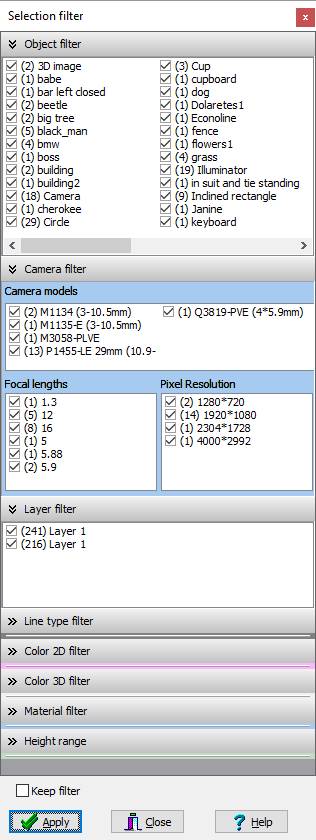
The Selection filter panel allows you to quickly filter selected objects and cameras by many features and their combinations: type of construction or 3D models, camera models, lens focal lengths and camera resolutions, layers, line types, color in 2D and 3D, materials.
You can filter only objects that fit fully or partially within the specified range of heights. The range of heights can be measured from Zero ground (taking into account the heights of the layers on which the objects are located) or without taking into account the heights of the layers.
The Selection Filter panel contains drop-down windows in which lists of types of currently selected objects with marks appear. To filter the selection, leave marks only on the objects that you want to keep selected and click Apply or double-click on any window.
If the Keep filter checkbox is checked, the configured filter will be stored between selection operations. To work with the panel, you can also use the panel's pop-up menu.
The panel can be stretched with the mouse over the edge.
Together with the Selection Editing Panel, this tool provides great opportunities for group operations for quick and easy editing VideoCAD projects. |
фическое окно
Вкладки Планы